 0ef60e5828
Add A* pathing to enemies Add choice between havving Goblers chase player as priority or go to crystal |
||
|---|---|---|
| .. | ||
| Gizmos | ||
| NavMeshComponents | ||
| Unity | ||
| Gizmos.meta | ||
| LICENSE | ||
| LICENSE.meta | ||
| NavMeshComponents.meta | ||
| navmeshplus.pdf | ||
| navmeshplus.pdf.meta | ||
| package.json | ||
| package.json.meta | ||
| README.md | ||
| README.md.meta | ||
| Unity.meta | ||
NavMeshPlus
NavMeshComponents.Extensions provides you with ability to create navigation meshes that are generated automatically from your Scene geometry, which allows characters to move intelligently around the game world.
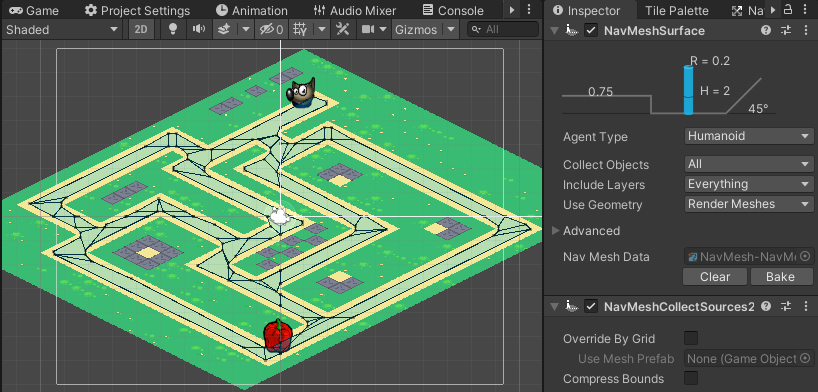
Unity 2D Pathfinding
This repo is fork of Unity NavMeshComponents enhanced with Extensions system for 2d Pathfinding and more. [link]
Wiki [here]
How To [here].
Demo [github].
Discuss [unityforum].
2D NavMesh
In repo you will find implementation of NavMeshSurface and 2d Extensions for tilemap, sprites and collider2d top down games.
To use it in your project:
- Copy repo into your Asset folder (or install as a package).
- Create Empty Object in scene root.
- Add "Navigation Surface" component to Empty Object and add NavMeshCollecSources2d component after.
- Click Rotate Surface to XY (to face surface toward standard 2d camera x-90;y0;z0)
- Add "Navigation Modifier" component to scene objects obstacles, override the area.
- In "Navigation Surface" hit Bake.
How does it works:
- It uses NavMeshSurface as base implementation.
- Implements world bound calculation.
- Implements source collector of tiles, sprites and 2d colliders
- Creates walkable mesh box from world bounds.
- Convert tiles, sprites and 2d colliders to sources as
NavMeshBuilderwould do.
Components & Extensions:
- NavMeshLink
- NavMeshModifier
- NavMeshModifierVolume
- NavMeshSurface:
- NavMeshCollectSources2d
- NavMeshCollectRootSources2d
- NavMeshCacheSources2d
Utilities
- NavMeshExtensionsProvider.cs
- NavMeshBuilder2d.cs
- NavMeshExtension.cs
- NavMeshBuilderState.cs
Setup
You can use this in two different ways: downloading this repository or adding it to your project's Package Manager manifest. Git must be installed and added to your path.
Alternatively, you can pick scripts and place in your project's Assets folder.
Method 1. Download
Download or clone this repository into your project in the folder Packages/com.h8man.2d.navmeshplus.
Method 2. Package Manager Manifest
The following line needs to be added to your Packages/manifest.json file in your Unity Project under the dependencies section:
"com.h8man.2d.navmeshplus": "https://github.com/h8man/NavMeshPlus.git#master"
Method 3. Add Package form git URL
Go to Package Manager click + and then select Add Package form git URL paste url:
https://github.com/h8man/NavMeshPlus.git